Complete Profile as Athlete
remarque
This is a second step in the Sign Up process. If you haven't sign up yet. Please go to Create an account guide.
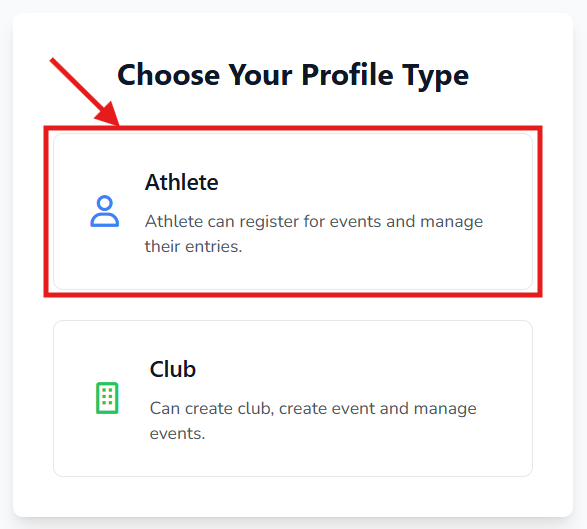
When you click on "Verify Email" button on your email. You will land on this page and Click on Athlete button to complete Athlete profile creation.
On this step, select the given 8 options. These options help us prefill your Event Registration forms.
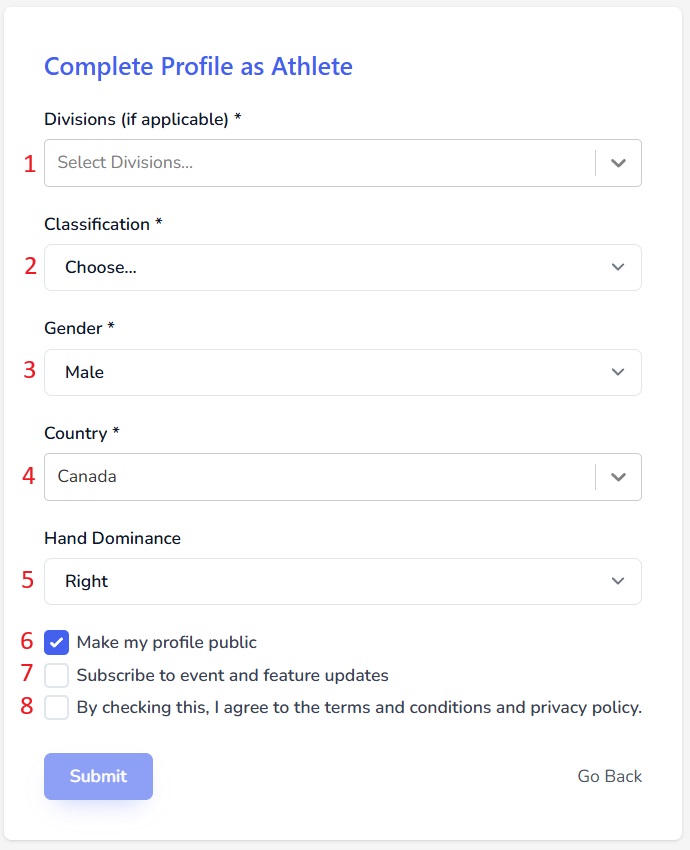
- Divisions (you can pick multiple or other)
- Classification (If not sure, pick Unclassified)
- Gender
- Country
- Hand Dominance (Helps to squad you)
- Make my profile public (If you uncheck this, your profile page and score history are hidden; your name and country can still be found when you or an organizer enter you into an event)
- Subscribe to event and future updates (Your email will be added to our mailing list. You can Opt-Out anytime afterwards)
- Terms & Conditions (You can review them from the links in our footer)
Go Back: If you want to go back and create a Club profile instead, click on the "Go Back" link.
Submit: Click on the "Submit" button to complete your Athlete profile.
Next Steps:Got a question? Reach out to us at support@targetscore.com or schedule a call.